GIF Size Limits for Slack, Email, Discord, LinkedIn and More (2026)
The limits are scattered across sixteen help centres, and Discord's changed as recently as August. We checked every one on the same day, linked the source, and left out anything we couldn't confirm.
By the Spark team ·

GIF size limits, as of October 2026: Discord takes 20 MB on a free account, 50 MB on Nitro Basic and up to 1 GB on Nitro. X takes GIFs up to 15 MB on the web and 5 MB on mobile. Notion's free plan caps every upload at 5 MB. Gmail allows 25 MB of attachments and Outlook 20 MB. Slack takes files up to 1 GB, but says custom emoji work best under 128 KB. Google Slides takes images under 50 MB, and GIPHY uploads up to 100 MB and 15 seconds.
The full table is below, sixteen rows, each with what happens when you go over and a link to the page it came from. We checked every row on the vendor's own help page on 24 October 2026. Where a vendor doesn't publish a GIF limit, we say so instead of guessing, and those apps sit in a separate table. Then the useful part: how to get a GIF under any of these numbers without making it look terrible, with sizes we measured on our own footage.
We're the Spark team, and we send GIFs to most of these places ourselves.
Every GIF size limit in one table
| Where | GIF limit (as of October 2026) | What happens over it | Source |
|---|---|---|---|
| Slack Slack, files | Up to 1 GB per file | Not stated. Images over 25,000 px on the longest side, or 45 million pixels in total, don't preview inline | Slack help |
| Slack Slack, custom emoji | Under 128 KB works best; GIFs up to 50 frames | Slack calls 128 KB what works best, not a hard cap | Slack help |
| Gmail Gmail | 25 MB of attachments per email, personal accounts | Gmail swaps the file for a Google Drive link | Gmail Help |
| Microsoft Outlook Outlook desktop | 20 MB for Outlook.com or Gmail accounts; 10 MB by default on Exchange | An error: the file is bigger than the server allows | Microsoft Support |
| Microsoft Outlook Outlook.com | 25 MB per attachment; OneDrive files up to 2 GB | Share it from OneDrive instead | Microsoft Support |
| Apple Mail Apple Mail with iCloud Mail | 20 MB per message | Mail switches to Mail Drop: up to 5 GB, kept for 30 days | Apple Support, Mail Drop limits |
| Discord Discord | Free 20 MB; Nitro Basic 50 MB; Nitro up to 1 GB | With Discord's chat setting for uploaded images on, images over 20 MB are shared as a download instead of shown | Discord help |
| Telegram Telegram | 2 GB per file; 4 GB with Premium | Not stated. Telegram re-encodes GIFs as MPEG4 video | Telegram FAQ, Telegram blog |
| X X | 15 MB on the web; 5 MB on mobile | Not stated. A GIF that plays only once shows as a still image | X help |
| LinkedIn LinkedIn | 500 frames or 36,152,320 pixels; the same page says files can't exceed 100 MB | Not stated | LinkedIn Help |
| Notion Notion | Free plan: 5 MB per file. Paid: up to 5 GB per file, though the same page says images must be under 5 MB | If an image is too large to display, upload it as a file | Notion help |
| Google Slides Google Slides | Under 50 MB and 25 megapixels | Not stated in the editor's help | Google Slides API guide |
| Canva Canva | 1 GB per upload: Canva counts a GIF as video | Not stated | Canva help |
| GIPHY GIPHY uploads | 100 MB and 15 seconds | GIPHY recommends 8 MB or less and no more than 6 seconds | GIPHY Support |
| Microsoft Teams Microsoft Teams | Chat: 100 MB per file, up to 10 attachments. A team's files: 250 GB per file | Over 10 attachments, an error message | Microsoft Learn |
| Mailchimp | 1 MB per image upload | Mailchimp's advice is to resize to 1 MB or smaller | Mailchimp Help |









Prices for the paid tiers, where they decide the limit: Discord lists Nitro Basic at $2.99 a month and Nitro at $9.99 a month on its Nitro page, as of October 2026.
Apps with no published GIF limit
Some apps you'll use most never put a number on it. We'd rather say that than invent one.
| Where | What is published (as of October 2026) | Source |
|---|---|---|
| PowerPoint PowerPoint | No GIF size limit. GIFs animate in the desktop apps; PowerPoint for the web can't play them in Slide Show | Microsoft Support |
| Keynote Keynote | No GIF size limit. Keynote keeps media in its original format, so every GIF adds its full size | Apple Support |
| WhatsApp WhatsApp | No GIF size limit. WhatsApp turns live photos and videos under six seconds into looping GIFs; documents go up to 2 GB | WhatsApp help, sending media |


Our own tests fill some of the gap. In Keynote, a GIF goes into the file byte for byte, so a 1.42 MB GIF made a 1.9 MB deck. The details are in our guides to adding a GIF to Keynote and inserting GIFs into PowerPoint. For Canva, where GIFs count as video, our guide to using GIFs in Canva covers uploads and downloads.
The limits that catch people out
Discord changed in August 2026. Its help says the free limit went from 10 MB to 20 MB, and that size is now checked before compression on every platform. On Android, Discord warns, you may hit the limit more often than before, even though the number is higher.
X has two numbers. 15 MB if you post from the web, 5 MB from the phone. And X's help says a GIF set to play once displays as a static image, so make sure yours loops. Making GIFs on the phone in the first place? Our iPhone guide covers Live Photos and Shortcuts.

Slack's 128 KB is advice. Slack's help says custom emoji under 128 KB "work best", with GIFs up to 50 frames. Ordinary GIFs posted in a channel can be up to 1 GB, though past 25,000 px on the longest side Slack won't preview one inline. Our guide to stopping references getting lost in Slack covers what happens to them after that.
Notion's free plan is tighter than it looks. 5 MB per file, GIFs included. On paid plans, Notion's own page gives two answers, 5 GB per file in its FAQ and 5 MB for images in its note, so test a big GIF before you rely on it.
Email is about the reader, not the limit. Gmail's 25 MB and Outlook's 20 MB are attachment ceilings. An inline GIF has to load as the message opens, and Mailchimp caps image uploads at 1 MB. Our guide to putting a GIF in an email covers the Outlook first frame problem too.
GIPHY's real target is smaller than its limit. Uploads can be 100 MB and 15 seconds, but GIPHY recommends 8 MB, 6 seconds, a 480p source and fewer than 200 frames, because its apps resize content for small screens.
How to get under a limit: width first
A GIF's size comes mostly from its width, then its length, then its frame rate. We cut three seconds of our own launch film, a sunlit hillside with reference cards floating past, at four widths:
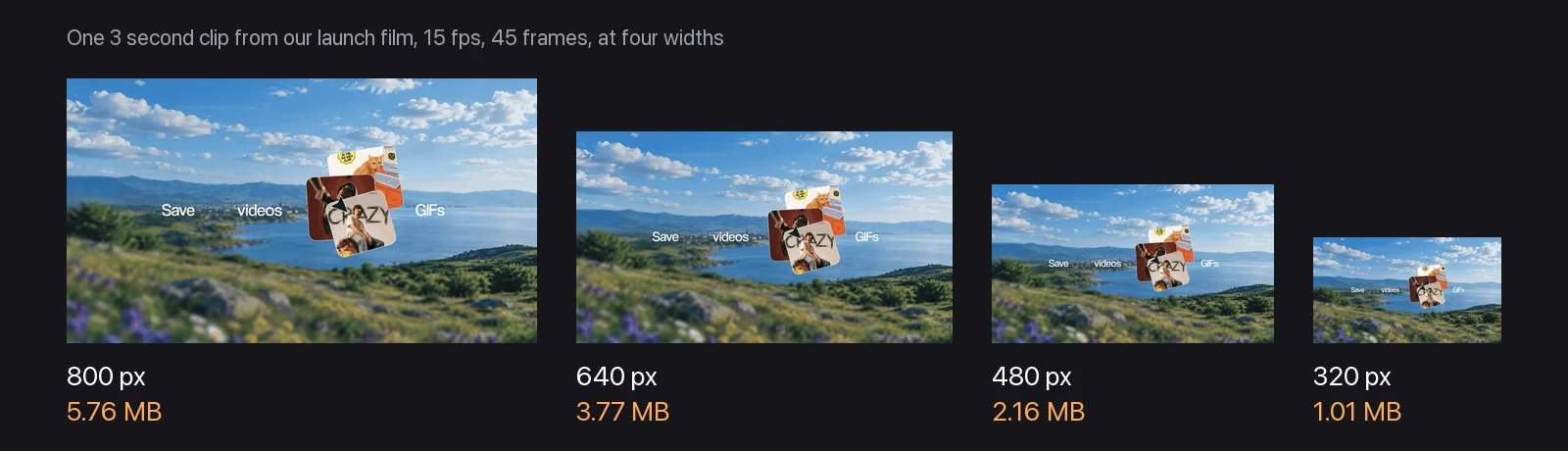
| Change | Before | After | Saving |
|---|---|---|---|
| 800 px to 640 px, 15 fps | 5.76 MB | 3.77 MB | 35% |
| 640 px to 480 px, 15 fps | 3.77 MB | 2.16 MB | 43% |
| 480 px to 320 px, 15 fps | 2.16 MB | 1.01 MB | 53% |
| 15 fps to 12 fps, at 480 px | 2.16 MB | 1.87 MB | 13% |
| 15 fps to 10 fps, at 480 px | 2.16 MB | 1.67 MB | 22% |
Dropping a third of the frames saved less than any single step down in width. So narrow it first, to the size it will actually be shown at, then trim the length, then take frames out. Colours and dithering come last. Our guide to reducing GIF file size ranks every lever with its own measurements.
Hitting a target with the free compressor
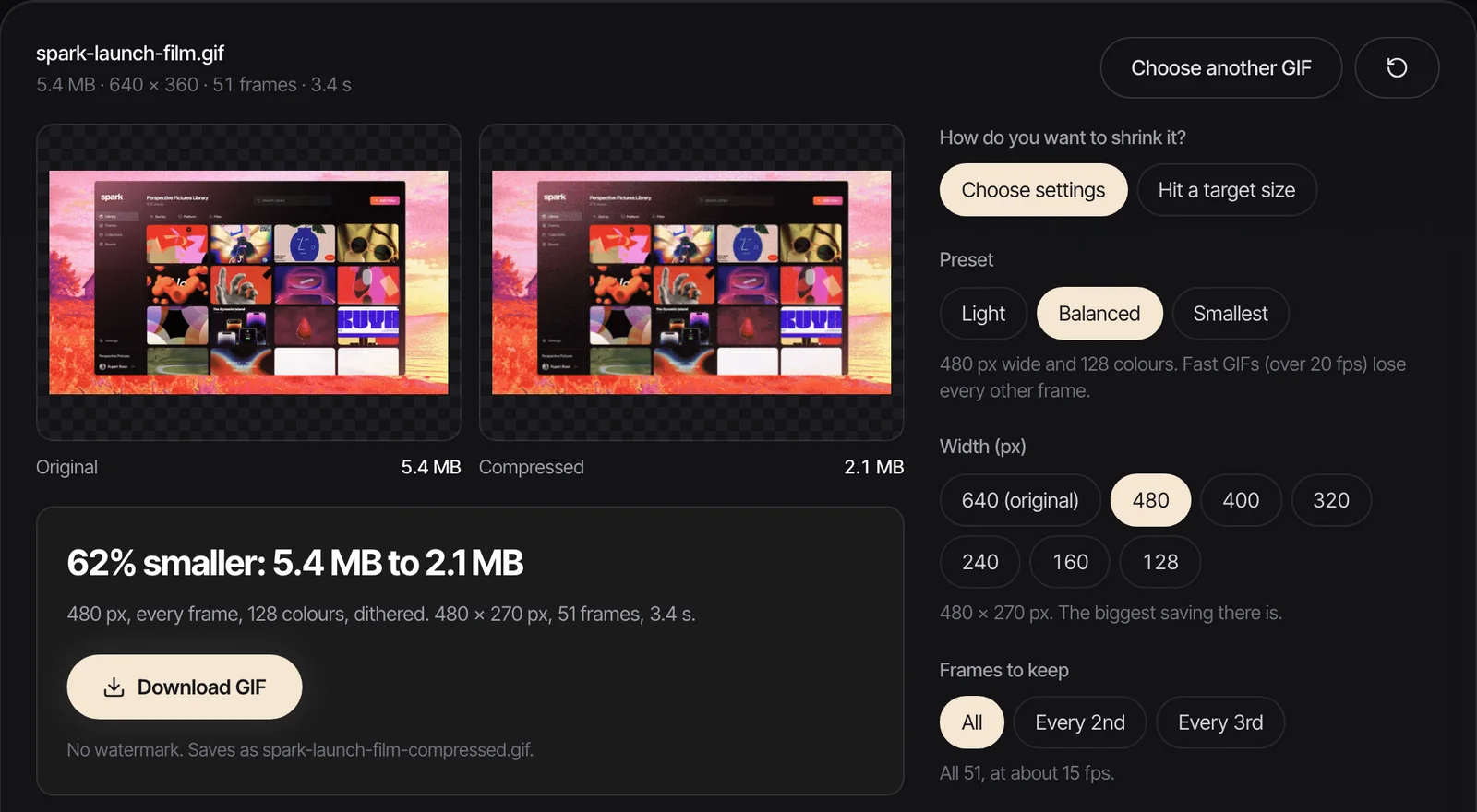
Our free GIF compressor has a Hit a target size mode built for exactly this table. It offers 128 KB for a Slack emoji, 1 MB for email, 5 MB for Notion's free plan and 20 MB for Discord's free limit, or any size you type in MB: 5 for X on mobile, 8 for GIPHY, 15 for X on the web. Then it tries settings until it finds the gentlest that fits. It shrinks the width first and gives up colours and frames only when it has to, and it all runs in your browser.
We ran the same engine on our 800 px, 5.76 MB hillside GIF:
| Target | What it chose | Result |
|---|---|---|
| 5 MB | 800 px, 128 colours, every frame | 4.17 MB |
| 2 MB | 576 px, 128 colours, every frame | 1.95 MB |
| 1 MB | 480 px, 64 colours, every other frame | 0.59 MB |
| 128 KB | 280 px, 32 colours, every third frame | 0.12 MB |


When a GIF is the wrong format
If the destination plays video, a GIF is rarely the smallest answer. The same three seconds at 800 px were 5.76 MB as a GIF and 0.32 MB as an H.264 MP4 in our test. Where video loops properly, as in Keynote with its Repeat menu, use video. GIF wins where a moving image has to play without anyone pressing anything, like an email or a Google Slides deck. Our GIF vs MP4 comparison goes app by app, and our guide to adding a GIF to Google Slides explains why Slides is GIF territory.
Start from the source, not the GIF
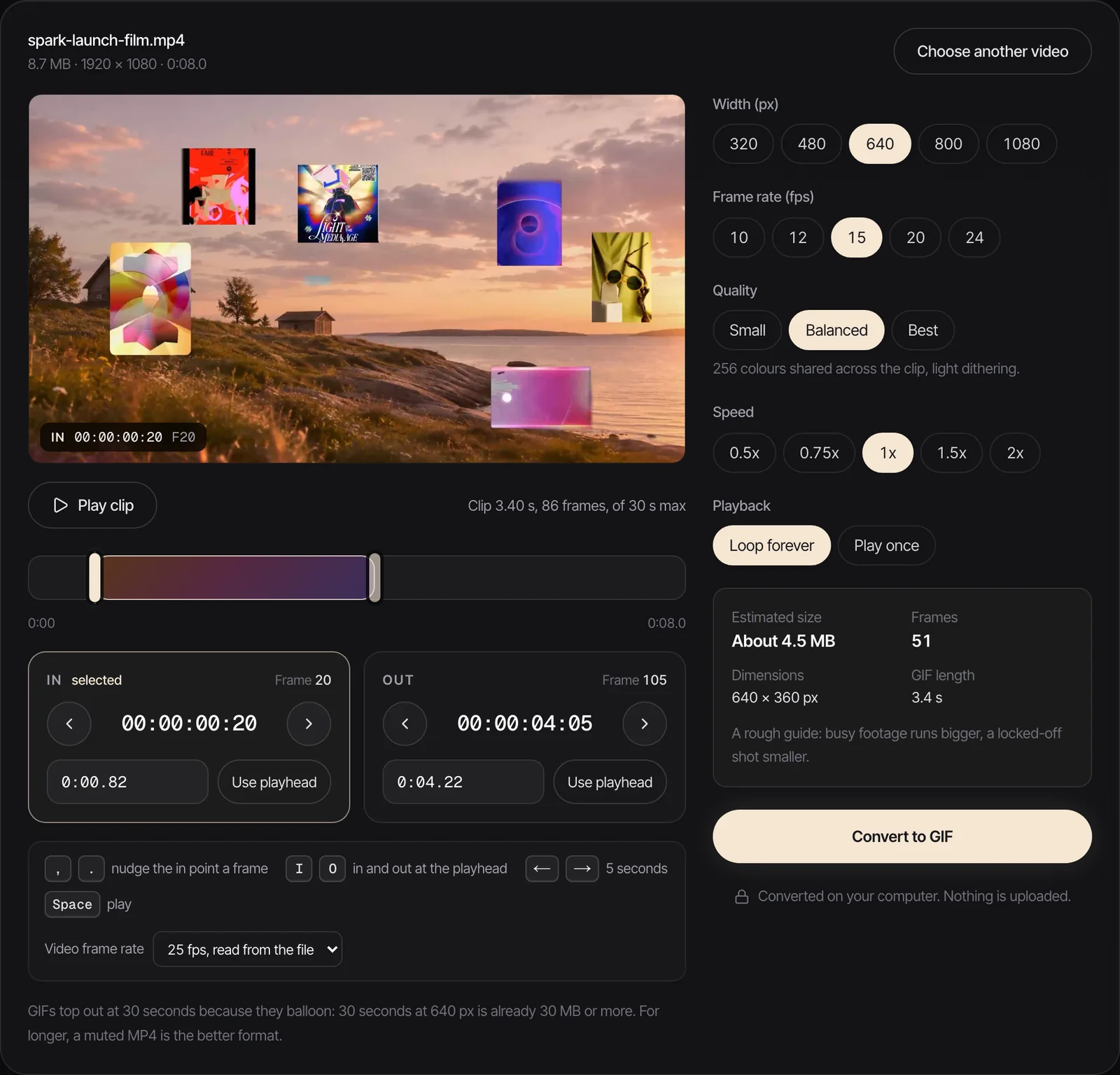
A GIF squeezed for Discord and then squeezed again for email looks like a photocopy of a photocopy. The better habit is to keep the original video and make a fresh GIF at the size each place needs. Our free video to GIF converter shows an estimated size before converting, so you can aim at a limit from the start.
If the clip is a reference you've saved in Spark, the original stays in the library. Export GIF cuts the seconds you need at the frame rate and width you choose, and saves the GIF to Frames, so a 320 px version for Slack and a 640 px version for a deck both come from the same source. On Studio, links posted in a connected Slack channel save to the library too.
FAQs
What is the maximum GIF size on Discord?
As of October 2026, 20 MB on a free account, 50 MB with Nitro Basic and up to 1 GB with Nitro, per Discord's File Attachments FAQ. Discord raised the free limit from 10 MB in August 2026 and now checks file size before compression on every platform.
What is the GIF size limit on X (Twitter)?
X's help says animated GIFs can be up to 15 MB when posted from the web and 5 MB from mobile, as of October 2026. A GIF that plays only once shows as a static image on X, so export it to loop.
What is the GIF size limit for Slack?
Slack lets members and guests upload files up to 1 GB. For custom emoji, Slack says square images under 128 KB work best, and GIFs can have up to 50 frames. Slack only previews images inline under 25,000 px on the longest side and 45 million pixels in total.
How big can a GIF be in an email?
Gmail allows 25 MB of attachments on personal accounts and Outlook 20 MB on Outlook.com and Gmail accounts, as of October 2026. For a GIF in the body of an email, aim for 1 MB or less, which is Mailchimp's upload cap and recommendation for images.
What is Notion's file size limit for GIFs?
On Notion's free plan, every uploaded file, GIFs included, must be under 5 MB. For paid plans, Notion's help says files can be up to 5 GB but also that images must be under 5 MB, so test a large GIF before relying on it.
How do I make a GIF smaller to fit a size limit?
Reduce the width first, then trim the length, then lower the frame rate, and only then cut colours. Our free GIF compressor's Hit a target size mode does this search for you: give it a size like 1 MB or 5 MB and it finds the gentlest settings that fit, in your browser.
Keep reading
All articles
How to Make a Seamless Looping GIF
A GIF plays its worst moment every two seconds: the cut from the last frame back to the first. We measured that jump on our own loops, then fixed it four different ways.

How to Turn a Screen Recording Into a GIF (Mac and Windows)
Interface GIFs should be tiny and crisp, and most come out blurry and heavy. We recorded our own tools page, converted it a dozen ways and found the one thing that blows up the file.

How to Add a GIF to Keynote So It Actually Plays
Keynote is the kindest app to a GIF, right up until the file leaves your Mac. We built a test deck and exported it every way Keynote allows, so you know what arrives where.